Use Case: Your field technician receives a dispatch or completes a form that shares matching mapped entity values with previous submissions. Work History displays historical records from those earlier jobs. Your technician then reviews past work right on their mobile device and makes informed decisions that help improve team performance.
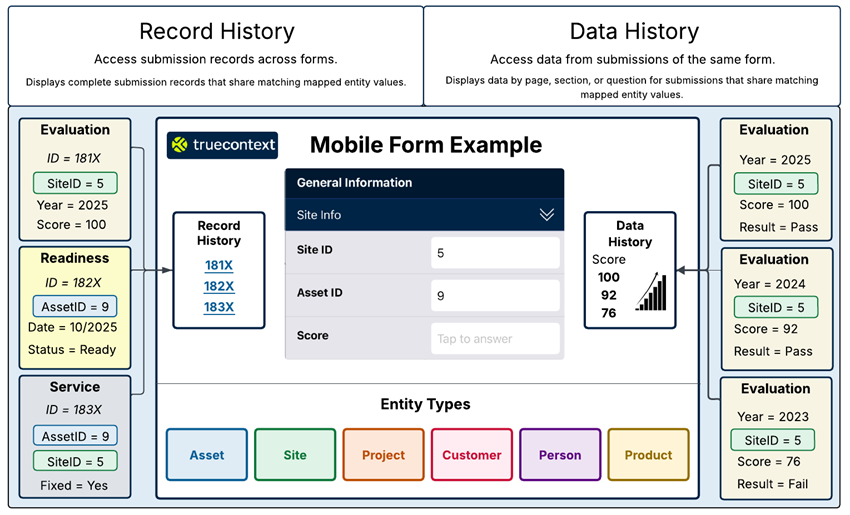
Work History enhances productivity in the field by giving mobile users easy contextual access to submissions of related jobs. Work history uses mapped entitiesAn entity is a category that identifies who or what a form is about, such as an asset, site, project, customer, person, or product. such as an asset, site, project, customer, person, or product to identify related submissions. When a user fills out a form that has a mapped entity, work history automatically surfaces past work associated with that same entity. There are two types of work history: record history and data history. Each provides a different level of insight. Let's have a look at each of these in the mobile app. In this example, a user is doing preventative maintenance on an asset. Upon scanning the asset's QR code, work history becomes available. The user can then access the record history. Record history gives the user a list view of past submissions related to the asset. These submissions can be from any form. If the user needs more information on the asset, they can load more submissions. This helps technicians prepare for the work they will do on the site. The user can then select a submission and access a high level view of all the data captured in that workflow. They can download images and review all the submitted answers. Back in the form, the user can access data history at the page, section, or question level. Data history shows answer level history from previous submissions of same form based on a single matching entity value. In this case, the asset. Users can compare specific answers right where they're working. In this example, the user can check whether the issues identified were present in the past. So they open the data history at the section level and see the issues that have been reported. They can download and see past photos, and they can select the arrows to go back to earlier submissions. They can see that some of the identified issues were present in the past. The user continues to fill out the form. When the user reaches a question about the weight of CO2 cylinders, they can see what the weight was in previous maintenance checks. To do that, they open the answer history. This shows the user a list of past weights, or a graph that also shows each weight. Because the question is set up with exceptions, it's easy for the user to see if the weight of the cylinder was acceptable or not. The user can load more data to dig further into past answers. With this context built directly into the form, users can make more informed decisions, maintain continuity across visits, and complete work more efficiently.
Work History overview
The following diagram shows the two Work History features.
 A form question mapped to an entity type, used to match other submissions that share the same answer. values. Entity Types available to map are: Asset, Site, Project, Customer, Person, and Product.